
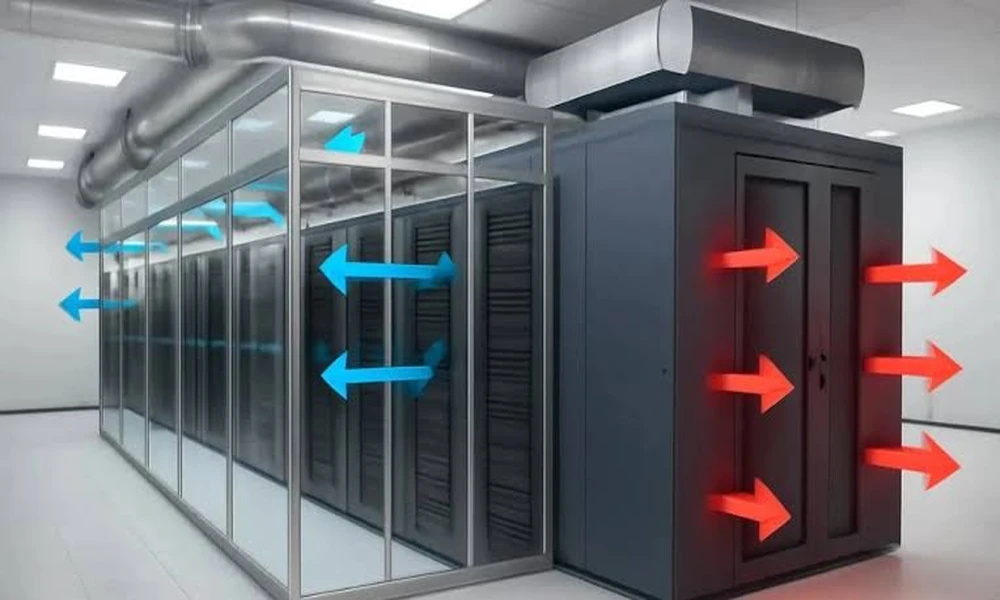

A few years ago, a typical server rack in an enterprise data centre drew a few kilowatts of power. Racks built for artificial intelligence workloads can now draw many times that. Every watt of power that goes into a server comes out as heat, and that heat has to be removed reliably, around the clock, or equipment slows down, fails, or shuts itself off.
That’s why data centre operators in the US and UK increasingly rely on airflow and heat transfer simulation. Before moving a rack, adding a row of high-density equipment, or changing a cooling unit, they can see how air and heat will move through the room, and catch problems before they cost money or uptime.
Why airflow is harder than it looks
On paper, cooling a data centre seems simple: supply enough cold air to cover the heat load. In practice, air rarely goes where it’s supposed to.
Most air-cooled facilities arrange racks in alternating hot and cold aisles. Servers draw cool air from the cold aisle at the front and exhaust hot air into the hot aisle at the back. Problems start when those streams mix. Hot exhaust air can recirculate over the top or around the ends of racks back into server inlets. Cold air can bypass the servers entirely, returning to the cooling units without doing any useful work. Gaps in racks, missing blanking panels, poorly placed floor tiles, and cable openings all make it worse.
The result is a room where the cooling units are working hard and using a lot of energy, while some servers still run hot. Adding more cooling often doesn’t fix it, because the trouble lies in where the air goes.
What simulation shows
Airflow and heat transfer simulation, usually using computational fluid dynamics, models the room in three dimensions: racks, cooling units, raised floors, ceilings, containment, cable trays, and the heat produced by each piece of equipment. It then calculates air velocity, pressure, and temperature throughout the space.
The results show things that are hard to measure directly. Temperature maps reveal hot spots at server inlets. Airflow paths show where recirculation and bypass are happening. Pressure maps under a raised floor show whether perforated tiles are delivering the air they’re meant to. Operators can see why a particular rack runs hot.
Testing changes before making them
The biggest value of simulation is testing changes virtually. Common uses include:
- Planning where to place new high-density racks so they get enough cooling without affecting neighbours.
- Comparing containment options, such as enclosing the cold aisle or the hot aisle, before investing in hardware.
- Checking what happens if a cooling unit fails or is taken offline for maintenance, so operators know whether the room can ride through.
- Raising supply air temperatures safely to save energy, by confirming that every server inlet stays within limits.
- Designing new halls and comparing cooling layouts before construction.
ASHRAE’s thermal guidelines for data processing environments, widely used in both the US and UK, recommend server inlet temperatures between roughly 18°C and 27°C (about 64°F to 81°F) for most equipment. Many facilities run colder than they need to, as a safety margin against hot spots. Simulation can show whether that margin is really needed, and higher supply temperatures can cut cooling energy significantly.
The shift toward liquid cooling
As rack densities climb, air alone is reaching its limits. Many new AI-focused facilities use liquid cooling, such as rear-door heat exchangers, direct-to-chip cold plates, or immersion cooling. These systems remove most of the heat through liquid, but rooms still usually need air cooling for the remaining load and for other equipment.
Simulation is just as important in these hybrid facilities. Designers need to model how much heat stays in the air, how liquid and air systems interact, and what happens to temperatures if a liquid loop fails. Heat transfer modelling of cold plates and coolant distribution also helps size pumps, pipework, and heat rejection equipment.
Energy, the grid, and regulation
Data centre energy use has become a major policy topic on both sides of the Atlantic. In the US, Lawrence Berkeley National Laboratory’s Center of Expertise for Data Center Energy publishes research on data centre electricity demand and offers free tools, including air management assessment tools, to help operators improve efficiency. In the UK, the government designated data centres as Critical National Infrastructure in 2024, reflecting how much of the economy depends on them, and grid connection capacity has become a major constraint on new sites.
Better airflow management is one of the cheapest ways to reduce cooling energy in an existing facility. Fixing recirculation and bypass, adding containment, and raising supply temperatures can reduce the energy spent on cooling without new chillers.
Keeping the model alive
A simulation is only as useful as it is current. Data centres change constantly as equipment is added, moved, or removed. Many operators now maintain a calibrated model of each hall, updated as the layout changes and checked against temperature sensor readings. Some call this a digital twin. When a model matches measured temperatures, operators can trust its predictions about future changes.
Where to start
For operators who don’t yet use simulation, a sensible first step is to model one hall that has known hot spots or is due for expansion. Compare the model with sensor data, fix the obvious airflow problems it reveals, and measure the effect on server temperatures and cooling energy. That first project usually makes the case for using simulation more widely, and it gives the team a clear view of how air really moves through their rooms.
